
Contents
- 🔌 What Exactly *Is* a USB Cable?
- ⚡️ The Evolution: From USB 1.0 to USB4
- 🤔 Navigating the Standards: Speed, Power, and Purpose
- 🔌 Beyond the Basics: Adapters, Hubs, and Dongles
- 💡 Choosing Your Cable: A Practical Guide
- 💰 Cost & Value: What You're Paying For
- ⭐ User Reviews & Common Gripes
- ⚠️ The Dark Side: Counterfeits and Compatibility Nightmares
- 🚀 The Future of Connectivity: Beyond USB?
- 🛠️ Maintenance & Longevity Tips
- Frequently Asked Questions
- Related Topics
Overview
The Universal Serial Bus (USB) cable, a seemingly simple piece of hardware, has become the de facto standard for connecting devices worldwide. From its humble beginnings in the mid-1990s, USB has evolved through numerous iterations, dramatically increasing data transfer speeds and power delivery capabilities. Understanding the distinctions between USB-A, USB-C, and their associated protocols (like USB 2.0, 3.0, 3.1, 3.2, and the latest USB4) is crucial for optimizing device performance and ensuring compatibility. Beyond mere connectivity, USB cables are central to the charging ecosystem for everything from smartphones to laptops, influencing how we power our portable technology. The ongoing development of USB standards, particularly the dominance of USB-C, signals a future of even greater interoperability and faster data exchange.
🔌 What Exactly *Is* a USB Cable?
A USB cable is the ubiquitous digital umbilical cord, a physical conduit for both data and power. Its primary function is to connect electronic devices, enabling them to communicate and share resources. Think of it as the universal translator for your gadgets, from your smartphone to your external hard drive, and even your humble keyboard. Without these cables, the interconnected digital world we inhabit would simply cease to function, rendering our devices isolated islands. The humble USB cable is, in essence, the unsung hero of modern computing and consumer electronics.
⚡️ The Evolution: From USB 1.0 to USB4
The history of the USB cable is a fascinating journey of iterative improvement, beginning with USB 1.0 in 1996, offering a modest 12 Mbps transfer speed. This was a significant leap from proprietary serial and parallel ports. The subsequent USB 2.0 standard in 2000 boosted speeds to 480 Mbps, becoming the workhorse for years. Then came USB 3.0 (later rebranded as USB 3.2 Gen 1) in 2008, pushing speeds to 5 Gbps, and USB 3.1 (USB 3.2 Gen 2) to 10 Gbps. The latest iteration, USB4, released in 2019, leverages the Thunderbolt 3 protocol to achieve speeds up to 40 Gbps, capable of handling high-resolution displays and multiple high-speed devices simultaneously.
🔌 Beyond the Basics: Adapters, Hubs, and Dongles
The USB ecosystem extends beyond simple cables. USB hubs allow you to expand a single USB port into multiple, essential for desktops with limited ports. USB adapters and dongles bridge the gap between different USB versions or connector types, allowing older peripherals to connect to newer devices. For example, a USB-C to USB-A adapter is indispensable for connecting legacy devices to modern laptops. These accessories are critical for maintaining compatibility and maximizing the utility of your existing hardware.
💡 Choosing Your Cable: A Practical Guide
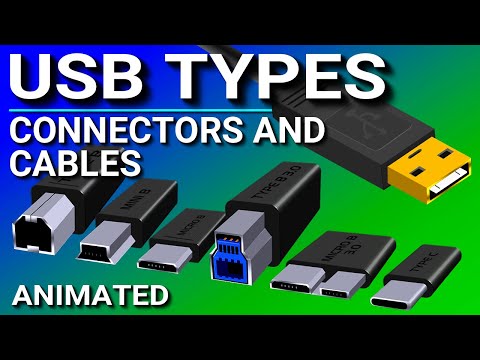
Choosing the right USB cable depends on your needs. For basic charging and data transfer of smartphones or peripherals like keyboards and mice, a standard USB 2.0 or USB 3.0 cable will suffice. If you're transferring large files, backing up external drives, or connecting high-resolution monitors, opt for a USB 3.2 or USB4 certified cable. Always check the cable's specifications for supported speeds and power delivery, especially if you're investing in fast charging or high-bandwidth applications. Don't forget to consider the connector type: USB-A, USB-B, Micro-USB, Mini-USB, and the increasingly prevalent USB-C.
💰 Cost & Value: What You're Paying For
The price of a USB cable can range from a few dollars for a basic, unbranded cable to upwards of $50 for high-speed, certified USB4 or Thunderbolt cables from reputable brands. Generally, you get what you pay for. Cheaper cables often use lower-quality materials, leading to slower speeds, unreliable connections, and a shorter lifespan. Certified cables, particularly those supporting USB PD or high data rates, come with a premium due to rigorous testing and superior construction, ensuring optimal performance and safety for your devices.
⭐ User Reviews & Common Gripes
User reviews frequently highlight issues with durability, with many complaining about frayed cables and broken connectors after only a few months of use. Compatibility is another common pain point; a cable advertised as 'high-speed' might not perform as expected if it's not properly certified or if the device it's connected to doesn't support the same standard. Conversely, users praise cables that offer robust build quality, reliable fast charging, and seamless data transfer. The convenience of USB-C's reversible connector is almost universally lauded, though the confusion around its various speed capabilities remains a persistent frustration.
⚠️ The Dark Side: Counterfeits and Compatibility Nightmares
The market is flooded with counterfeit and uncertified USB cables, particularly from less reputable online marketplaces. These cables can pose significant risks, including data corruption, slow charging, and even fire hazards due to poor construction and lack of safety features. Always look for official certification marks (like the USB-IF logo) and purchase from trusted brands. Mismatched standards can also lead to compatibility issues; a USB 3.0 device connected with a USB 2.0 cable will only operate at USB 2.0 speeds, a common source of user confusion and disappointment.
🚀 The Future of Connectivity: Beyond USB?
While USB4 and Thunderbolt 4 offer impressive speeds, the future of connectivity is always in flux. Technologies like Wi-Fi 6E and future wireless standards aim to reduce reliance on physical cables for many tasks. However, for high-bandwidth, low-latency applications like charging powerful devices, connecting external GPUs, or high-speed data transfers, wired connections will remain essential. The evolution of USB standards will likely continue, focusing on increased speed, enhanced power delivery, and potentially integrating new functionalities.
🛠️ Maintenance & Longevity Tips
To maximize the lifespan of your USB cables, avoid bending them sharply at the connector ends, as this is where most stress occurs. Don't yank cables out of ports; grip the connector itself. Store cables loosely coiled rather than tightly wrapped. For USB-C cables, be mindful of their specific capabilities – using a basic USB 2.0 USB-C cable for a high-speed data transfer will limit your performance. Regularly inspect cables for any signs of wear or damage, and replace them immediately if compromised to prevent potential damage to your devices or data loss.
Key Facts
- Year
- 1996
- Origin
- USB Implementers Forum
- Category
- Technology & Infrastructure
- Type
- Standardized Technology
Frequently Asked Questions
What's the difference between USB 3.0, USB 3.1, and USB 3.2?
These designations can be confusing due to rebranding. USB 3.0 (2008) was initially 5 Gbps. USB 3.1 (2013) introduced two speeds: USB 3.1 Gen 1 (5 Gbps, same as USB 3.0) and USB 3.1 Gen 2 (10 Gbps). USB 3.2 (2017) further complicated things by renaming these: USB 3.2 Gen 1 (5 Gbps), USB 3.2 Gen 2 (10 Gbps), and introducing USB 3.2 Gen 2x2 (20 Gbps) which requires two lanes. Always check the specific Gbps rating rather than just the name.
Can I use any USB-C cable for fast charging my laptop?
No, not all USB-C cables support high-wattage charging. For fast charging laptops, you need a cable specifically rated for USB PD and a sufficient wattage (e.g., 60W, 100W, or even 240W for the latest standards). Basic USB-C cables might only support 15W or 30W, which is insufficient for most laptops. Check the cable's specifications and look for PD certification.
Are expensive USB cables worth the money?
For basic charging and data transfer, a moderately priced cable from a reputable brand is usually sufficient. However, if you need high-speed data transfers (e.g., for external SSDs), 4K/8K video output, or high-wattage charging, investing in a certified, higher-quality cable is often worthwhile. These cables use better materials and shielding, ensuring reliability and performance that cheaper alternatives can't match.
What does 'backward compatible' mean for USB cables?
Backward compatibility means a newer standard can work with older devices or ports. For example, a USB 3.0 port can accept a USB 2.0 cable, but the connection will operate at the slower USB 2.0 speed. Similarly, a USB 3.0 cable can be plugged into a USB 2.0 port, again defaulting to the slower speed. This ensures that your older peripherals can still connect to newer systems.
How can I tell if a USB cable is counterfeit?
Counterfeit cables often lack official branding, certification logos (like the USB-IF logo), and may have poor build quality (flimsy connectors, uneven molding). They might also be significantly cheaper than comparable products from known brands. Purchasing directly from the manufacturer or authorized retailers is the safest bet to avoid fakes.
What is the difference between USB 3.2 Gen 2x2 and Thunderbolt 4?
USB 3.2 Gen 2x2 offers speeds up to 20 Gbps using two lanes of 10 Gbps. Thunderbolt 4, on the other hand, also offers up to 40 Gbps but mandates stricter requirements for data, display, and power delivery compared to USB standards. Thunderbolt 4 guarantees support for two 4K displays or one 8K display, whereas USB 3.2 Gen 2x2 does not have such display mandates. Thunderbolt 4 is generally considered a more robust and feature-rich standard.